
Introduction
Google MCM facilitates a direct relationship between advertisers/technology providers (like Truvid) and publishers. This connection is crucial for Google, as it ensures transparent and efficient ad management. Participating in MCM not only grants access to Google's premium ad demand but also allows the integration of non-Google demand sources.
For more details, check out Google's official announcement on MCM.
Prerequisites
Before diving into the MCM approval process, ensure you've completed the first three steps outlined in the Truvid Ad Integration Guide for Publishers. These foundational steps are critical for a smooth approval journey.
Steps for Google MCM Approval
-
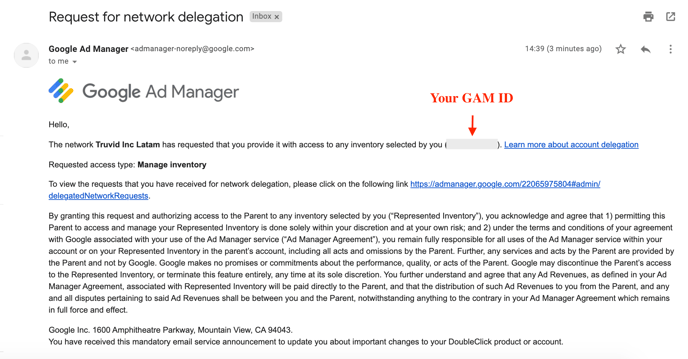
Receive Invitation Email: Once your ads.txt lines are implemented and active, you'll receive an email from Google Ad Manager.
-
View Request: Use the provided link to view the approval request.
-
Accept the Request: Finalize the process by clicking the 'Accept' button at the bottom of the page.
Note:
The approval process typically spans 1-2 days, though on rare occasions, it may extend up to 14 days.
Next Steps After Google MCM Approval
While awaiting Google MCM domain approval, initiate the creation of widgets and selection of content for your playlists. Once your domain is approved by Google MCM and your widgets are ready with the chosen content, you will be prepared for video monetization. For detailed instructions on this, refer to step 4 of the Truvid Ad Integration Guide for Publishers.
Conclusion
Gaining Google MCM approval is a pivotal step for publishers aiming to maximize their ad revenue and enhance their digital advertising capabilities. By following this guide, you can navigate the approval process effectively, setting the stage for advanced ad monetization opportunities.